
How to Create a Hidden or Secret Booking Type
Foodzilla lets you create hidden booking types that do not appear on your public booking page.
These booking types can still be booked using their direct link, making them useful for private consultations, selected clients, special services, or appointments you do not want publicly listed.
How to Hide a Booking Type
- Go to Forms & Bookings
- Open the Bookings tab
- Select Booking Types
- Find the booking type you want to hide
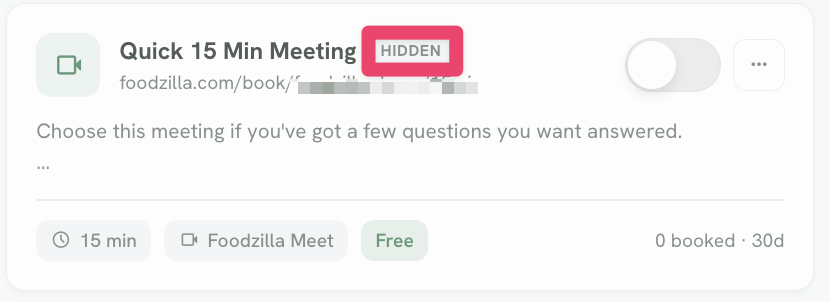
- Turn its visibility toggle off
The booking type will now show as Hidden and will no longer appear on your public booking page.
Share a Hidden Booking Type
Even when hidden, the booking type still has its own direct booking link.
You can copy this link and share it privately through:
• SMS
• Messaging
• Your client portal
• Any other private communication channel
Anyone with the direct link can still access and book the appointment.
Make It Public Again
To show the booking type on your public booking page again, simply return to Booking Types and turn the visibility toggle back on.
When to Use Hidden Booking Types
Hidden booking types are useful for:
• Existing clients only appointments
• Private consultations
• Complimentary sessions
• Special programs
• VIP or invite only services
• Internal or test booking types
• Services you want accessible only through a direct link
This gives you more control over which services are publicly promoted while still keeping private booking options available when needed.