
Create Your Own Recipe Collections
Foodzilla offers over 100,000 online recipes, complete with nutrition data, ingredients, photos, and links to the original author.
Recipe collections help you organise recipes by theme, dietary need, cuisine, programme, or client goal. For example, you could create collections for One Pot Meals, High Protein Recipes, PCOS Friendly Meals, or Quick Breakfasts.
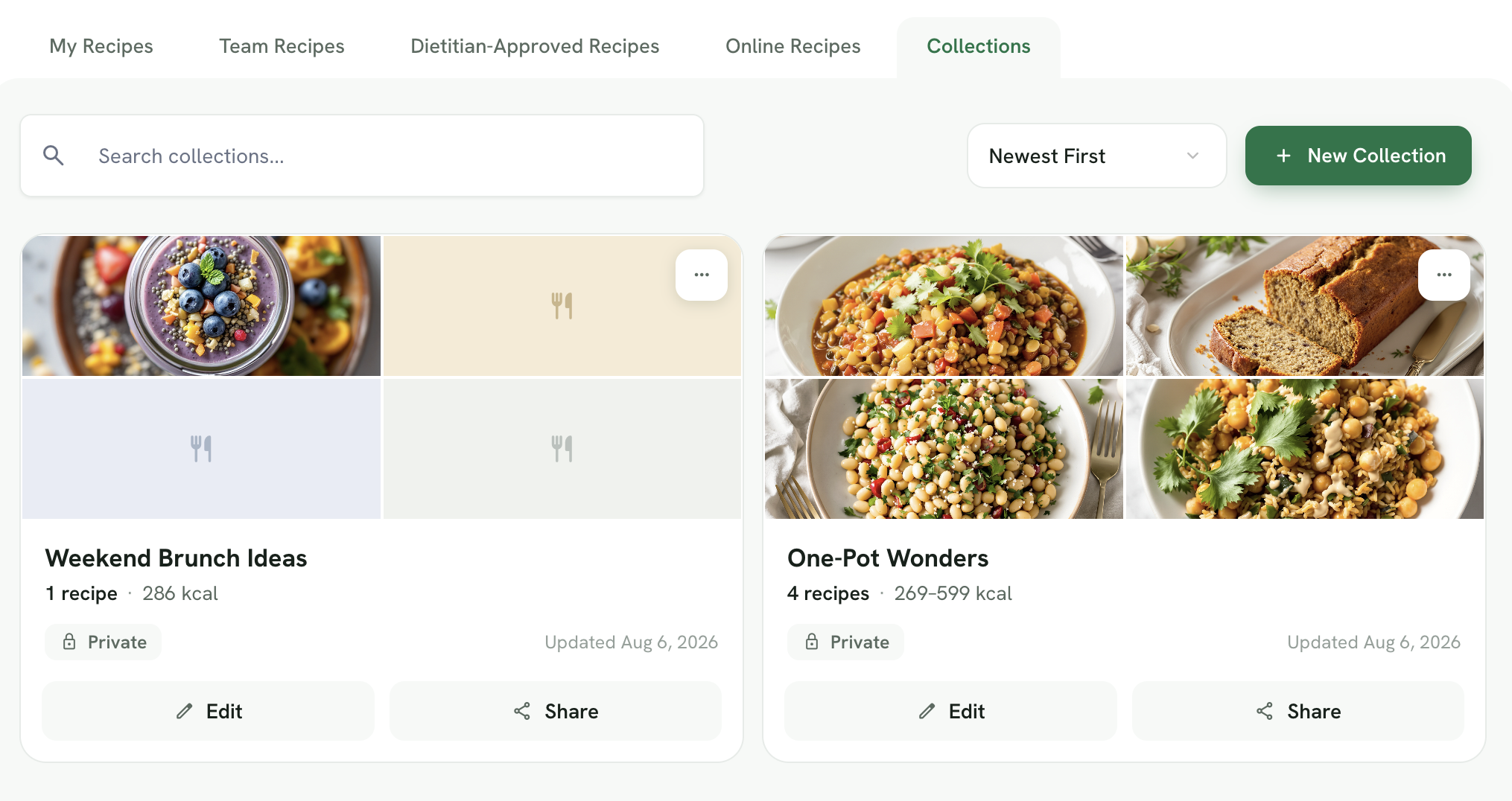
Create a New Collection
- Go to the Recipes page
- Open the Collections tab
- Click New Collection
- Enter a collection name
- Click Create Collection
Your new collection will then appear in the Collections tab.
Add Recipes to a Collection
From Inside the Collection
- Open the collection
- Click Add Recipes
-
Choose from:
• My Recipes
• Team Recipes
• Dietitian Approved Recipes
- Search or filter the recipe library
- Select one or more recipes
- Add them to the collection
- Click Save
You can select multiple recipes at once.
From an Individual Recipe
- Open the recipe
- Click Add to Collection
- Choose an existing collection or create a new one
You can view the collection in Gallery or Detail view and use filters to find recipes more easily.
Find and Organise Recipes
Within a collection, you can:
• Search recipes by name
• Use recipe filters
• Switch between Gallery and Detail views
• Remove recipes you no longer need
• Review calories, macros, fibre, and servings
• Open recipes to view or edit their details
Available filters may include meal type, dietary preferences, ingredients, cooking time, nutrition requirements, and other recipe criteria.
Edit Collection Details
Open the Details tab to update the collection name, description, notes, or other available information.
Click Save after making changes.
Edit a Recipe From a Collection
Open the recipe you want to change, then select the edit option.
You can update ingredients, quantities, cooking steps, labels, images, and other recipe details. Edited copies are saved under My Recipes.
Share a Collection With Clients
To give clients access to a collection:
- Open the collection
- Find the collection you want to share
- Click Share on the collection card
- Select one or more clients
- Click Save
You can also click Edit to open and manage the collection, or use the ••• menu for additional options.
Shared clients receive read only access through the Foodzilla mobile app and Client Web Portal. They can view the recipes and collection notes but cannot modify the collection.
You can also open the collection, click More, and select Email to send the collection directly.
Export a Collection as a PDF
- Open the collection
- Click Export
-
Choose your PDF settings, including:
• Nutrition information
• Weight units
• PDF language
• Recipe layout
• Font style
• Accent colour
- Click Download PDF
Create a Shareable PDF Link
From the export settings, click Create PDF Web Link instead of downloading the file.
Generated links are stored under the collection’s PDF Links tab, where you can access and share them later.
Pro Tips
- Use clear, descriptive names for your collections
- Add notes to remember why you created the collection
- Regularly update your collections to keep them relevant
- Use filters to quickly find specific recipes within large collections
- Export collections to PDF when you need to share them with clients
Using Recipes in Meal Plans
Collections are versatile and can be used in many ways:
- Client Meal Planning: Create collections of recipes tailored to specific client needs
- Quick Access: Keep your favorite or most-used recipes in one place
- Sharing: Export collections to PDF to share with clients
- Organization: Group recipes by theme, season, or dietary requirements
For more information on meal planning, check out this article.
By following these steps, you can easily create and manage your own recipe collections, streamlining the meal planning process for your clients. If you have any questions, feel free to contact us. 😊